

If you run a small or mid-sized business in Texas and think an HRIS is just fancy payroll software, you are leaving serious value on the table. An HRIS system (Human Resource Information System) is a centralized platform that manages employee data, automates HR workflows, and keeps your business compliant with state and federal regulations. Many Texas business owners and HR managers discover too late that their disconnected spreadsheets and manual processes are costing them time, money, and compliance exposure. This guide breaks down exactly what an HRIS system is, how it works, what it costs, and how to implement one without the headaches.
Table of Contents
- What is an HRIS system and how does it work?
- Benefits of adopting an HRIS for Texas small and mid-sized businesses
- How to implement an HRIS system in your Texas SMB: timeline, costs, and common pitfalls
- Comparing cloud-based and on-premise HRIS: choosing the right system for Texas SMBs
- Why most Texas SMBs overlook key HRIS implementation risks and how to avoid them
- How Quick HR Solutions can help Texas SMBs implement the right HRIS
- Frequently asked questions
Key Takeaways
| Point | Details |
|---|---|
| Centralized HR data | An HRIS provides a single system to store and manage all employee information and automate core HR tasks. |
| Efficiency gains | Using an HRIS reduces HR admin time by about 40% and cuts payroll errors significantly. |
| Implementation planning | Successful HRIS deployment requires data cleaning, contract negotiation, and prioritizing must-have integrations. |
| Deployment choice | Cloud-based HRIS systems offer easier compliance management and scalability for Texas SMBs than on-premise options. |
| Avoid common pitfalls | Texas SMBs should audit legacy data and watch for auto-renewal contract traps to maximize HRIS value. |
What is an HRIS system and how does it work?
An HRIS system is software that acts as the single source of truth for all your employee information. Think of it as a digital filing cabinet combined with an automation engine. Instead of hunting through spreadsheets for someone's hire date or manually calculating PTO balances, the system handles it automatically.
According to industry research, 80% of companies now use some form of HRIS, with the software maintaining detailed employee information and automating core HR processes like payroll, benefits administration, time tracking, and recruiting. That adoption rate tells you something important: this is no longer a "nice to have" for growing Texas businesses.
Here is what a typical HRIS system manages:
- Employee records: Personal details, job history, compensation, certifications, and performance data stored in one place
- Payroll processing: Automated pay calculations, tax withholding, and direct deposit tied directly to time and attendance data
- Benefits administration: Enrollment, changes, and eligibility tracking for health insurance, 401(k), and other benefits
- Time and attendance: Clock-in/out tracking, PTO requests, and schedule management
- Recruiting and onboarding: Job postings, applicant tracking, offer letters, and new-hire paperwork
- Compliance reporting: Automated alerts and reports for EEOC, ACA, FMLA, and Texas-specific requirements
One question that comes up often: what is the difference between an HRIS, an HRMS (Human Resource Management System), and an HCM (Human Capital Management) platform? The short answer is scope. An HRIS focuses on core transactional processes, the day-to-day data management and automation. An HRMS adds workforce management tools. An HCM goes further with talent management, succession planning, and strategic analytics. For most Texas SMBs, a solid HRIS is the right starting point before considering broader platforms.
Before you go live, read through this HR software implementation guide to understand what the rollout process actually involves.
Benefits of adopting an HRIS for Texas small and mid-sized businesses
Understanding what an HRIS system does leads naturally to the clear benefits it offers, especially for businesses like yours in Texas.

The numbers are hard to argue with. HRIS adoption reduces HR admin time by 40%, cuts payroll processing errors by 22%, and 87% of US workers now access self-service portals that reduce help desk inquiries by 50%. For a Texas SMB with a lean HR team, that kind of efficiency gain is the difference between staying reactive and actually getting ahead.
Here is where Texas businesses see the most immediate impact:
- Payroll accuracy: Automated calculations eliminate the manual errors that trigger costly corrections and employee frustration
- Compliance confidence: Automated alerts for Texas-specific requirements, like the Texas Payday Law and required workplace postings, reduce your legal exposure
- Employee self-service: Workers update their own addresses, download pay stubs, and request time off without emailing HR
- Real-time reporting: Managers pull headcount, turnover, and compensation reports in minutes instead of hours
"HRIS improves efficiency by replacing paper-based systems with automated workflows, ensuring compliance and real-time insights." SAP HRIS efficiency insights
Pro Tip: Before selecting an HRIS, map out your three biggest HR pain points. If payroll errors and compliance tracking top that list, prioritize systems with strong payroll integrations and built-in compliance alerts rather than platforms loaded with talent management features you will not use for another two years.
Texas businesses also face specific compliance pressures around workers' compensation, unemployment insurance, and the state's at-will employment nuances. A well-configured HRIS keeps documentation current and audit-ready. Check this Texas HR compliance checklist to see which requirements your current setup may be missing.
For businesses not ready to hire a full-time HR director, pairing an HRIS with fractional HR support is a cost-effective way to get both the technology and the expertise.
How to implement an HRIS system in your Texas SMB: timeline, costs, and common pitfalls
Now that you see the value of HRIS, let's cover how to successfully implement one without surprises.
HRIS implementation typically takes 4 to 12 weeks, with costs averaging $8.50 per employee per month plus $0 to $10,000 in implementation fees in 2026. Smaller businesses under 100 employees usually land on the shorter end of that timeline. Larger SMBs with complex data or multiple locations take longer.
Here is a practical implementation sequence:
- Audit your current data before touching any software. Pull all employee records and identify duplicates, missing fields, and inconsistent formatting.
- Select your HRIS based on your top three pain points, not the longest feature list.
- Negotiate your contract upfront, including exit clauses and renewal notice requirements.
- Clean and migrate your data with a dedicated internal owner responsible for quality checks.
- Configure payroll and tax integrations first, since these deliver the fastest measurable return.
- Train your team in phases, starting with HR administrators before rolling out employee self-service.
- Run parallel payrolls for at least one cycle to catch discrepancies before going fully live.
Implementation cost comparison by business size:
| Company size | Typical timeline | Monthly cost estimate | Implementation fee range |
|---|---|---|---|
| Under 50 employees | 4 to 6 weeks | $200 to $500/month | $0 to $2,000 |
| 50 to 150 employees | 6 to 10 weeks | $500 to $1,500/month | $1,000 to $5,000 |
| 150 to 500 employees | 8 to 12 weeks | $1,500 to $5,000/month | $3,000 to $10,000 |
Data migration is where most implementations stall. Cleaning employee records takes 3 to 5 hours per 100 records, and 60% of SMBs encounter quality issues that extend their timelines. Budget time for this before your go-live date, not after.
One contract trap that catches Texas business owners off guard: auto-renewal clauses requiring 60-day notice that lock you into 12-month terms costing $3,500 or more annually. Read the fine print and negotiate a 30-day cancellation window or at minimum a written reminder in your calendar.
Pro Tip: Ask your HRIS vendor for a data migration template before signing anything. If they cannot provide one, that is a red flag about their implementation support quality.
For a full walkthrough of the rollout process, the HR software implementation success guide covers each phase in detail. If you want local guidance during selection or setup, HR consulting for Texas SMBs is worth exploring before you commit to a vendor.
Comparing cloud-based and on-premise HRIS: choosing the right system for Texas SMBs
To make the most of your HRIS investment, understanding deployment options is crucial. Let's compare cloud-based and on-premise systems.
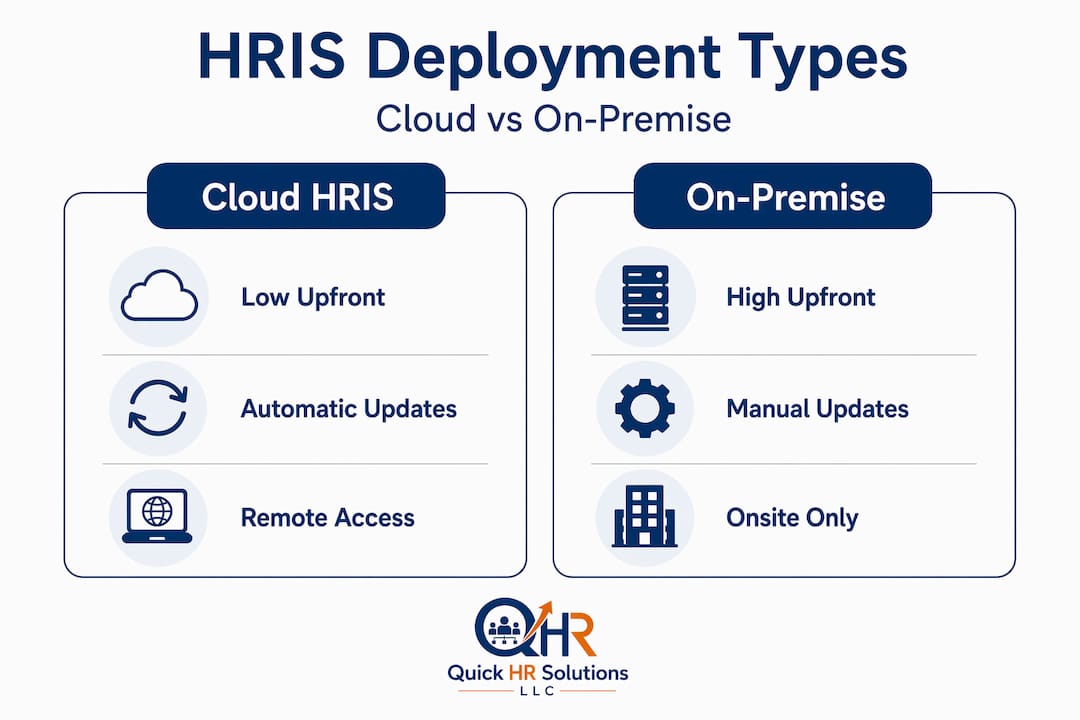
Cloud HRIS is now preferred by 78% of new deployments among mid-sized businesses seeking Texas compliance without heavy IT support. That preference is not surprising when you look at what cloud systems actually offer compared to on-premise alternatives.
| Feature | Cloud HRIS | On-premise HRIS |
|---|---|---|
| Upfront cost | Low (subscription-based) | High (licensing + hardware) |
| IT requirements | Minimal, vendor managed | Significant internal IT needed |
| Compliance updates | Automatic | Manual, requires IT involvement |
| Scalability | Easy, add users as you grow | Requires hardware upgrades |
| Data control | Vendor-hosted, check security terms | Full internal control |
| Implementation speed | Faster, typically 4 to 8 weeks | Slower, often 3 to 6 months |
For most Texas SMBs, cloud wins on almost every dimension. The lower upfront cost alone makes it accessible for businesses with 20 to 200 employees. Automatic compliance updates mean you are not scrambling every time Texas or federal employment law changes.
Cloud HRIS also reduces manual errors by up to 40% in payroll and attendance automation, largely because data flows directly from time tracking into payroll without manual re-entry.
On-premise systems still make sense in narrow situations: highly regulated industries with strict data residency requirements, or organizations with existing IT infrastructure and the staff to maintain it. For the typical Dallas-Fort Worth manufacturer, professional services firm, or healthcare practice, cloud is the practical choice.
Pro Tip: When evaluating cloud vendors, ask specifically about their data encryption standards and SOC 2 compliance. A vendor that cannot answer those questions clearly is not ready to handle your employee data.
For guidance on structuring HR reporting within your chosen system, this resource on HR reporting for Texas companies is worth bookmarking. And if you are still working through your compliance baseline, revisit the Texas HR compliance checklist before finalizing your vendor selection.
Why most Texas SMBs overlook key HRIS implementation risks and how to avoid them
Here is the uncomfortable truth about HRIS implementations: the technology rarely fails. The business does.
After working with Texas SMBs across manufacturing, healthcare, and professional services, the pattern is consistent. Companies spend weeks evaluating features and pricing, then rush the parts that actually determine success: data quality, contract terms, and scope control.
Data migration issues extend timelines by weeks, and the root cause is almost always the same. No one audited the legacy spreadsheets before the project started. You cannot migrate clean data from a messy source. Audit first, migrate second. Every time.
The contract trap is just as predictable. Auto-renewal clauses with 60-day notice requirements are standard in HRIS agreements, and most business owners do not read that section until they are already locked in for another year. Negotiate exit terms before you sign, not after you want to leave.
The third risk is over-customization. Customization beyond out-of-the-box features doubles testing time and drives up implementation costs. Texas SMBs that chase every custom workflow end up with systems that are expensive to maintain and painful to upgrade. Start with payroll and tax integrations. Those deliver measurable ROI within the first quarter. Everything else can wait.
The businesses that get the most from their HRIS are not the ones with the most features turned on. They are the ones that implemented cleanly, trained thoroughly, and measured outcomes from day one. If your current HRIS is not reducing admin time or payroll errors, the problem is usually configuration, not the software itself.
Before you go live, walk through this implementation success guide and treat it as a checklist, not light reading.
How Quick HR Solutions can help Texas SMBs implement the right HRIS
With the right guidance, your business can avoid the pitfalls above and actually get the return HRIS technology promises. That is exactly where Quick HR Solutions supports Texas SMBs like yours.
Our fractional HR services in Dallas give you SHRM-certified HR expertise without the cost of a full-time hire. We help Texas SMBs evaluate HRIS options based on their actual needs, not vendor sales pitches. We manage data migration planning, vendor contract review, and compliance configuration so your implementation does not stall at the finish line. Whether you are selecting your first HRIS or fixing a system that never delivered, Quick HR Solutions brings the hands-on experience to get it right. Book a free consultation and find out what your HRIS should actually be doing for your business.
Frequently asked questions
How does an HRIS differ from payroll software?
An HRIS includes payroll functions but also stores and manages all employee data, benefits, time tracking, and compliance reporting in one platform. Payroll software handles pay calculations and tax withholding, while an HRIS does that plus employee records, benefits, time tracking, and reporting.
How long does it take to implement an HRIS in a small business?
Implementation generally takes between 4 and 12 weeks depending on company size and data complexity. Businesses under 100 employees typically complete implementation in 4 to 6 weeks, while those with 100 to 500 employees take 8 to 12 weeks.
What are common mistakes Texas SMBs make with HRIS contracts?
The most common mistake is overlooking auto-renewal clauses that require 60-day cancellation notice and lock businesses into 12-month terms. Auto-renewal traps in HRIS contracts catch many SMB owners off guard and result in unexpected annual costs of $3,500 or more.
Why is data migration often challenging during HRIS implementation?
Data migration is difficult because employee records from legacy spreadsheets often contain duplicates, missing fields, and inconsistent formatting that must be cleaned before transfer. Cleaning employee records takes 3 to 5 hours per 100 records, and 60% of SMBs encounter quality issues that extend their implementation timelines.
Are cloud-based HRIS systems better for Texas SMBs?
Cloud HRIS systems are generally the better fit for Texas SMBs because they require minimal IT support, update automatically for compliance changes, and scale easily as your workforce grows. 78% of new mid-sized business deployments now choose cloud options specifically to manage Texas compliance without heavy internal IT resources.