

Rushing an HR software rollout is one of the most expensive mistakes a Texas business can make. A poorly planned implementation creates compliance gaps, frustrates employees, and turns what should be a productivity win into a months-long headache. The good news is that with a clear, structured approach, you can avoid the pitfalls that derail most projects. This guide walks you through every critical phase, from initial needs assessment to post-launch governance, so your HR software delivers real compliance value and measurable employee engagement results from day one.
Table of Contents
- Assessing your needs and laying groundwork
- Mapping out your HR software implementation steps
- Ensuring compliance, privacy, and secure data migration
- Driving user adoption, change management, and engagement results
- Continuous improvement: Governance, troubleshooting, and optimization
- What most HR software guides miss: Governance as your secret weapon
- Expert help for your HR software journey
- Frequently asked questions
Key Takeaways
| Point | Details |
|---|---|
| Thorough planning matters | A detailed requirements and compliance review prevents costly HR software mistakes. |
| Adoption drives results | User support and change management improve implementation success and engagement. |
| Compliance is complex | Update internal policies and access controls to keep pace with changing regulations in Texas. |
| Governance sustains value | Ongoing post-launch checks and ownership prevent errors and optimize HRIS return on investment. |
| Benchmark engagement wisely | Rely on internal engagement data over external benchmarks for actionable team insights. |
Assessing your needs and laying groundwork
With the problem framed, the next logical step is to get organized and clear about what your business truly needs from HR software.
Before you open a single vendor demo, you need a firm picture of what you're solving for. Many Texas SMBs make the mistake of selecting software based on price or a colleague's recommendation, then discovering the system doesn't support their payroll schedule, can't handle Texas-specific leave policies, or lacks the reporting fields their CPA requires. That discovery usually happens after contracts are signed.
Start by documenting your business drivers. Are you trying to automate onboarding? Centralize compliance records? Improve employee self-service? Each driver maps to specific features, and knowing your priorities upfront prevents scope creep later. A Texas HR compliance checklist is a practical starting point for identifying the regulatory requirements your system must support, including Texas Payday Law, at-will employment documentation, and OSHA recordkeeping.
The State of HR Compliance 2026 found that a growing share of HR leaders report rising complexity in their compliance needs, which means the bar for "good enough" keeps moving. Your system needs to be built for where compliance is heading, not just where it is today.
A strong HRIS implementation checklist confirms that implementation planning must explicitly cover privacy and data handling, compliance and policy updates, role-based access controls, and clearly defined approval authorities. These aren't optional add-ons. They are foundational requirements.
Requirements review table
| Area | Key questions | Owner |
|---|---|---|
| Core HR features | Payroll, onboarding, PTO, benefits | HR Manager |
| Compliance | Texas Payday Law, FMLA, OSHA | HR + Legal |
| Privacy and security | Data encryption, consent, access controls | IT + HR |
| Integrations | Payroll vendor, ATS, time tracking | IT |
| Engagement baseline | Current survey data, turnover rate | HR Manager |
- Assign a named owner to each requirement area before vendor conversations begin
- Collect at least two cycles of employee engagement survey data to establish a baseline
- Document which processes are currently manual and estimate the time cost of each
- Identify which managers will need system access and at what permission level
Pro Tip: Involve at least one frontline manager in your requirements sessions. They surface practical workflow needs that HR leaders often overlook, and their early involvement builds buy-in for the rollout ahead.
If you're working without a dedicated HR department, HR consulting for Dallas small businesses can help you structure this phase efficiently without over-investing internal time.
Mapping out your HR software implementation steps
Once needs are defined, it's time to tackle each implementation phase systematically.
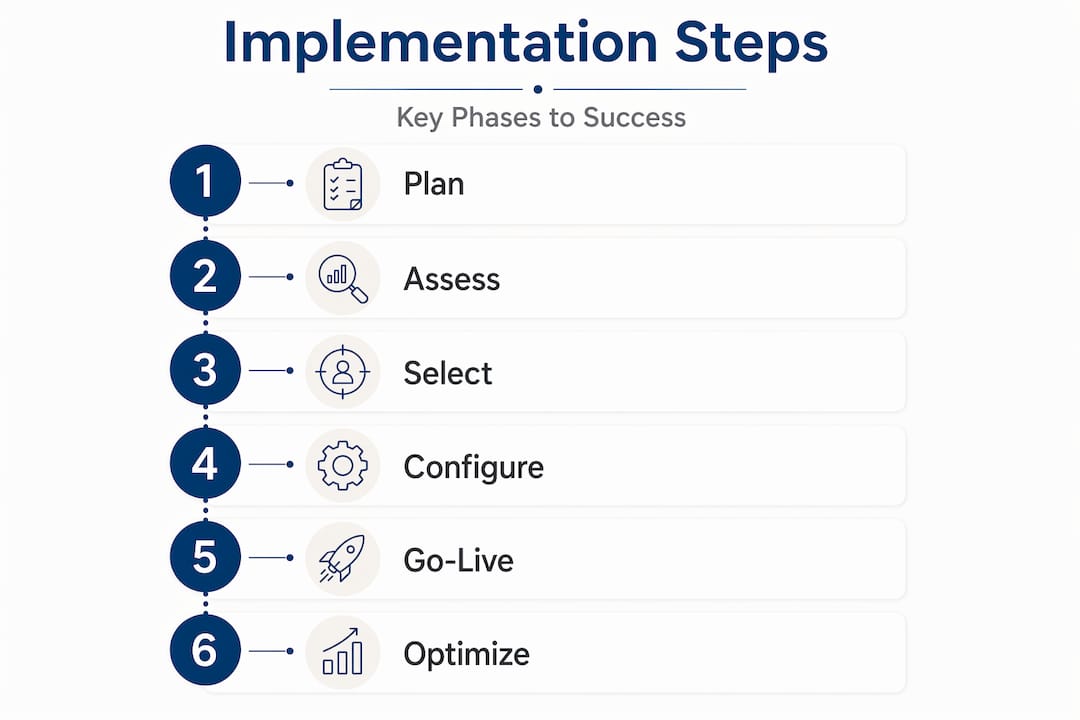
Implementation without a roadmap is just expensive improvisation. A structured, seven-step process gives your team clear milestones, reduces rework, and keeps stakeholders aligned. The HRIS implementation checklist from Deel outlines a concrete approach for SMBs that includes requirements fit, data export, manager configuration, time-off policy setup, and thorough testing before go-live.
Seven-step implementation process
- Define requirements and select your system. Confirm the shortlisted platform meets every documented requirement. Run a formal fit-gap analysis to identify anything the system can't do natively.
- Prepare and clean your data. Export all existing employee records. Remove duplicates, standardize field formats, and flag any missing data points before migration begins.
- Configure the system. Set up org structures, pay groups, time-off policies, and approval workflows. This is where your compliance requirements get built into the system logic.
- Set up role-based access and approval chains. Define who can view, edit, and approve each data type. This step directly protects you from privacy violations and unauthorized changes.
- Run a test migration in a sandbox environment. Migrate a sample data set and verify that all records transferred correctly, relationships are intact, and calculated fields produce accurate results.
- Conduct user acceptance testing (UAT). Have managers and employees complete real tasks in the test environment. Document every error and resolve it before proceeding.
- Execute go-live and monitor closely. Launch during a low-activity period if possible. Assign a dedicated support contact for the first two weeks and track error logs daily.
Critical note: Requirements gathering is not a one-time meeting. It's an ongoing conversation that should continue through configuration and testing. Teams that treat it as a single checkbox consistently discover expensive gaps during UAT or, worse, after go-live.
Phased rollout vs. big bang: Which is right for you?
| Factor | Phased rollout | Big bang rollout |
|---|---|---|
| Risk level | Lower, issues isolated to one group | Higher, problems affect everyone at once |
| Timeline | Longer overall | Faster to full deployment |
| Cost | Higher due to parallel systems | Lower upfront coordination cost |
| Best for | Companies with 50+ employees or complex payroll | Small teams with simple, uniform processes |
| Change management | Easier to manage in waves | Requires intensive upfront training |
Pro Tip: Always run sandbox testing with real (anonymized) employee data, not dummy records. Dummy data rarely exposes the edge cases that break real payroll calculations or leave balance logic.
Building employee engagement strategies into your implementation plan from the start, rather than bolting them on afterward, significantly improves adoption rates. A fractional HR consultant guide can help you decide whether to manage this internally or bring in outside expertise for the more technical phases.

Ensuring compliance, privacy, and secure data migration
Following the execution phase, attention must shift to compliance and privacy essentials, areas Texas businesses can't afford to overlook.
Texas businesses operate under a layered compliance environment. You have federal requirements like FLSA, FMLA, and ADA sitting alongside Texas-specific rules around final pay timing, non-compete agreements, and workers' compensation. Your HR software must be configured to support all of these, not just the federal defaults.
The HRIS implementation checklist is explicit: role-based access controls and approval authorities must be built into the system design, not added later. This means defining who can see salary data, who can approve terminations, and who can modify compliance-related records before you go live.
Common Texas HR compliance pitfalls during implementation
- Failing to configure final paycheck timing rules (Texas requires payment within six days for involuntary terminations)
- Overlooking I-9 storage and audit trail requirements in the new system
- Not capturing employee consent for electronic signature and data processing
- Migrating outdated job descriptions that don't reflect current ADA accommodation language
- Leaving default access permissions in place instead of customizing role-based controls
The State of HR Compliance 2026 also flags that compliance responsibilities are expanding as automation and AI adoption accelerate. If your new HR system uses AI-assisted features for screening or scheduling, you need a clear policy on how those outputs are reviewed and documented.
Statistic callout: In 2026, a majority of HR leaders surveyed report that compliance complexity has increased compared to prior years, with AI and talent pressures cited as the primary drivers. Texas businesses adopting HR software with automated features face this complexity head-on.
Pro Tip: Map every data field from your legacy system to its destination field in the new platform before migration begins. A field mapping document catches mismatches early and prevents data from landing in the wrong place, which is especially critical for pay rate history and benefits enrollment records.
Revisit your Texas HR compliance checklist during the configuration phase to verify that every state-specific requirement has a corresponding system setting or documented manual process.
Driving user adoption, change management, and engagement results
Securing compliance paves the road for the next critical phase: getting buy-in and realizing engagement value.
A technically perfect HR system that nobody uses is a failure. User adoption is where most implementations quietly fall apart. Employees resist new tools when they don't understand why the change is happening, when training is rushed, or when leadership doesn't visibly use the system themselves.
Adoption and change management must be built into the implementation plan from the beginning, not treated as an afterthought in the week before go-live. Here's a practical framework built around four pillars:
Four pillars of change management for HR software
- Leadership buy-in. Executives and managers must use the system visibly and consistently. If your CEO still emails HR for PTO approvals instead of using the portal, employees will follow that lead.
- Clear, honest communication. Tell employees what is changing, why it's changing, and what it means for their daily workflow. Silence breeds rumor and resistance.
- Role-specific training. Managers need different training than employees. Payroll administrators need different training than both. Generic one-size-fits-all sessions waste time and leave gaps.
- Structured feedback loops. Create a formal channel for employees to report issues and ask questions during the first 90 days. Review feedback weekly and communicate what you've fixed.
Engagement KPIs worth tracking post-implementation
- Employee self-service adoption rate (percentage of employees completing tasks in the portal vs. contacting HR directly)
- Time-to-complete onboarding for new hires
- Manager response time on approval workflows
- Training completion rates for system modules
- Employee satisfaction scores tied specifically to HR processes
Expert caution: External engagement benchmarks can be misleading. A 72% engagement score sounds great until you realize it's measured differently across industries and company sizes. Prioritize your own internal benchmarks by team, location, or tenure, and track movement over time rather than chasing an external number that may not reflect your workforce at all.
Connecting your employee engagement strategies to specific system features, like recognition tools, pulse surveys, and manager dashboards, gives you measurable data to act on. When engagement dips, you'll know where to look. Pairing this with strategies to reduce employee turnover creates a compounding benefit that shows up in your bottom line.
Continuous improvement: Governance, troubleshooting, and optimization
Once your new system is live and teams are engaged, it's essential to establish practices that protect your investment and keep HR running smoothly.
Go-live is not the finish line. It's the starting line for a new set of responsibilities. Many HRIS projects deliver strong initial results and then quietly degrade over 12 to 18 months as workarounds accumulate, data quality slips, and nobody owns the ongoing configuration.
Post-go-live governance is critical to preventing the system from degrading into workarounds or incorrect data over time. Without it, you end up with managers keeping shadow spreadsheets, HR manually correcting payroll errors, and compliance records that don't match what's in the system.
Top five post-launch risk areas for Texas SMBs
- No designated system owner to manage updates and user access changes
- Failure to update configurations when employment law changes
- Data quality erosion as employees and managers enter inconsistent information
- Integration failures between HR software and payroll or benefits vendors
- Untrained new managers who inherit system access without proper onboarding
Ongoing governance practices that actually work
- Assign a named system administrator who owns configuration changes and vendor communication
- Schedule quarterly audits of user access permissions to catch outdated roles
- Build a change log that documents every configuration update and why it was made
- Require system training as part of manager onboarding, not just employee onboarding
- Review compliance-related system settings every time a relevant law changes at the state or federal level
Governance warning: Poor governance almost always creates future rework and cost. A system that runs without oversight for 18 months typically requires a partial reimplementation to fix data integrity issues, which costs more than maintaining it properly would have.
Pro Tip: Schedule a semi-annual gap assessment, ideally with an outside consultant who can evaluate your system objectively. Internal teams often can't see the workarounds they've normalized. A fractional HR optimization guide outlines how this kind of periodic review works in practice.
What most HR software guides miss: Governance as your secret weapon
Most implementation guides spend 90% of their content on the launch and almost nothing on what happens next. That's backwards. The real differentiator between an HR software project that delivers lasting ROI and one that becomes an expensive frustration is not how fast you launched. It's how consistently you govern the system after launch.
Common implementation failure modes cluster around governance gaps, missed requirements, data conversion errors, integration complexity, and weak payroll validation. Notice that most of these are ongoing risks, not one-time launch problems. A governance gap that starts small in month three becomes a compliance liability by month twelve.
We've seen Texas businesses invest significantly in a new HRIS platform, execute a technically solid go-live, and then watch the system slowly become unreliable because no one owned it after the implementation team left. The vendor moves on. The consultant wraps up. And suddenly the HR manager is the de facto system administrator with no training and no documentation.
The businesses that consistently outperform their peers treat governance as a standing agenda item, not a crisis response. They review requirements annually, audit access controls quarterly, and bring in outside eyes when internal teams get too close to the system to see its problems clearly. For Texas SMBs, governance gaps are a bigger threat than any technical challenge the software itself presents.
Expert help for your HR software journey
Getting HR software implementation right requires expertise that most small and mid-sized businesses don't have sitting in-house. The compliance requirements, data migration risks, and change management demands are real, and the cost of getting them wrong is significant.
QuickHR Solutions works directly with Texas SMBs to reduce implementation risk and accelerate time to value. Our SHRM-certified consultants bring hands-on experience with compliance configuration, employee engagement program design, and post-launch governance. Whether you need a full implementation partner or targeted support for a specific phase, we tailor our approach to your business size, industry, and budget. Explore our fractional HR services in Dallas or learn more about Fractional HR Consulting in Texas to see how we can support your next HR technology project from planning through optimization.
Frequently asked questions
What are the core phases in HR software implementation?
Phases include planning, requirements gathering, data migration, system configuration, go-live, and ongoing governance. A thorough HRIS implementation checklist confirms that privacy, compliance, and access controls must be addressed within the planning phase itself, not added later.
How do you ensure compliance during HR software implementation?
Review all privacy and security requirements upfront, update your policies to reflect the new system's workflows, configure role-based access controls, and collect employee consents for electronic processing. The HRIS implementation checklist specifically calls out approval authorities and data handling as non-negotiable planning elements.
What is the biggest risk post-implementation?
Weak governance and the absence of post-go-live checks are the leading causes of long-term HRIS problems. Post-go-live governance is what prevents systems from degrading into workarounds and inaccurate data over time.
Should we use external employee engagement benchmarks?
Internal benchmarking by team, tenure, or location is typically more reliable and actionable than external comparisons. External engagement benchmarks can be misleading because measurement methodologies vary widely across industries and company sizes.